Inflated Back to School Tumbler Wrap PNG
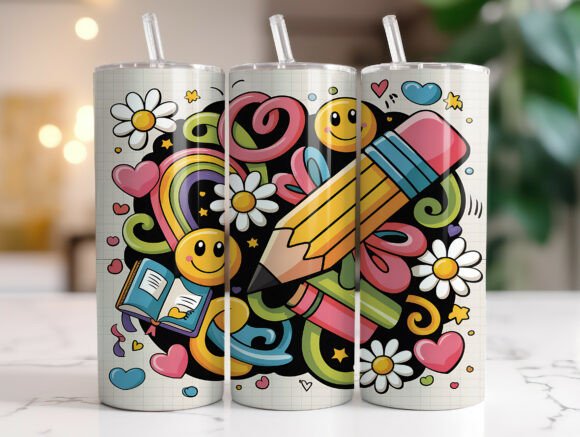
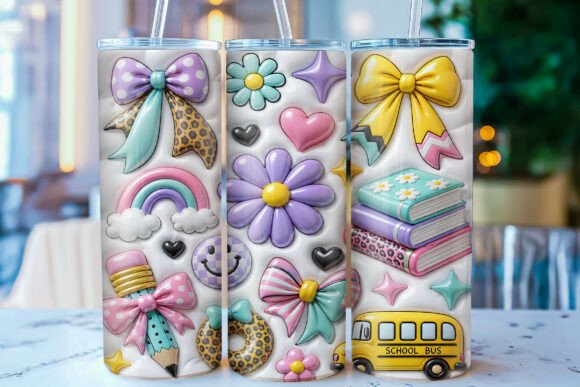
The start of a new academic year brings a wave of excitement, but for crafters and small business owners, it also means the pressure to create fresh, on-trend products. This is where the Inflated Back to School Tumbler Wrap PNG becomes an essential asset. Designed with a playful 3D aesthetic, this digital file features glossy puffy bows, pastel flowers, rainbows, smiley faces, school buses, books, pencils, hearts, and other classroom-inspired elements set against a soft white background. The unique inflated balloon-style effect gives every graphic element a raised, shiny appearance that stands out on sublimation prints.
However, simply downloading a high-resolution file does not guarantee a professional result. Many creators rush into production without understanding the technical nuances of sublimation printing or the specific requirements of their equipment. To help you avoid common pitfalls and ensure your back-to-school collection looks as polished as it feels, we need to look closer at what makes this design effective and how to apply it correctly.
Understanding the Design Potential and Technical Limits
The primary appeal of this wrap lies in its visual depth. Unlike flat vector graphics, the inflated style mimics the texture of a sticker or a balloon, adding a tactile quality to a 2D print. When applied to a 20oz skinny tumbler, the dimensions of 9.3″ x 8.2″ (2790 x 2460 px) are crucial. These measurements are tailored specifically for straight tapered tumblers, ensuring the pattern wraps seamlessly around the curve without distortion.
A frequent mistake occurs when users attempt to stretch or shrink this specific layout to fit different cup sizes. Because the design relies on the spacing between elements like the school bus and the pencil to maintain its "puffy" look, resizing can crush the details or leave awkward gaps. If you try to force this wrap onto a wide-mouth bottle or a standard cylindrical mug, the proportions will break, resulting in a distorted image that loses its charm. Always verify your blank's dimensions before applying this specific file.
Navigating File Formats and Resolution Pitfalls
You are receiving a high-resolution PNG file at 300 DPI, which is the industry standard for crisp sublimation results. However, the format itself carries specific limitations that beginners often overlook. PNG files support transparency, which is vital for wrapping designs so they don't print a solid white box around your colorful graphics. Yet, some users mistakenly open these files in software that defaults to a white background layer, effectively ruining the transparency.
Another critical detail is the inclusion of two separate PNG files: one for the left side and one for the right side of the tumbler. This "Straight Tapered" split is designed to prevent the seam from landing in the middle of a complex graphic, such as the center of a rainbow or a smiley face. A common error is merging these two images into one large file before printing. Doing so forces your printer to cut the design in the wrong place, potentially bisecting a key element like the school bus or breaking the continuity of the puffy bows. Keep the files separate until you have mirrored and positioned them correctly in your sublimation software.
Choosing the Right Sublimation Process
The glossy, shiny appearance of the inflated effect depends heavily on the materials you use. Sublimation ink turns into a gas under heat and bonds with polyester fibers or polymer coatings. If you use a low-quality blank with a thin coating, the vibrant colors of the pastel flowers and rainbow may appear dull or washed out. Furthermore, the "raised" look of the design is an optical illusion created by color gradients; if your printer's color profile is not calibrated, those subtle shadows that create the 3D effect might get flattened during the transfer.
To achieve the best results, ensure your tumbler has a high-gloss finish. Matte blanks will absorb the light differently, diminishing the "shiny" quality that defines this specific wrap. Additionally, check your heat press settings. Overheating can cause the sublimation ink to bleed, blurring the crisp edges of the pencil or the text. Underheating, conversely, leads to poor adhesion, causing the design to peel off after the first wash. Consistency is key to maintaining the integrity of the design.
Evaluating Your Workflow and Business Strategy
For entrepreneurs selling these tumblers, the efficiency of your workflow matters just as much as the final product. Since this is an instant digital download with no physical item involved, there is a temptation to skip the quality check step. Before listing your product or gifting it to a teacher, always do a test print on paper first. This allows you to verify that the colors match your vision and that the alignment of the two PNG files creates a seamless loop around the cup.
Many sellers make the mistake of assuming all tumblers are identical. Even within the same brand, manufacturing tolerances can vary slightly. What fits perfectly on one 20oz skinny tumbler might sit too high or too low on another. Always measure your specific blanks and adjust your design placement in your software accordingly. The provided dimensions are a starting point, not a rigid rule for every cup on the market.
Maximizing Value for Educators and Hobbyists
If you are a teacher or a hobbyist looking to personalize gifts, this design offers a fun way to celebrate the season. The combination of cute classroom elements like books and pencils with the whimsical balloon style makes it perfect for students who want something unique. However, remember that the durability of the design relies on proper care. While sublimation is permanent, harsh detergents and abrasive scrubbing can eventually fade the pastel tones over time. Hand washing is recommended to preserve the glossy finish and the vibrant details of the smiley faces and hearts.
When selecting your tools, invest in a reliable heat press rather than a cheap iron. An iron cannot provide the even pressure and consistent temperature required to bond the ink properly across the curved surface of a tumbler. Uneven pressure can lead to patchy areas where the "inflated" effect fails to show up, leaving parts of the design looking flat and unfinished.
Making the Final Decision
Before purchasing or downloading this asset, take a moment to review your current inventory. Do you have the correct blanks? Is your printer calibrated? Do you understand how to handle multi-file wraps? Answering these questions honestly will save you money on wasted materials and frustration. The Inflated Back to School Tumbler Wrap PNG is a powerful tool for creating eye-catching sublimation designs, but it requires a bit of preparation to unlock its full potential.
By respecting the specific dimensions, keeping the files separate, choosing high-quality blanks, and calibrating your equipment, you can produce tumblers that truly stand out. Whether you are building a home-based business or making a special gift for a favorite educator, attention to these details ensures that the final product matches the adorable, high-energy spirit of the back-to-school season. Take the time to learn the process, and you will find that creating these customized items is both rewarding and profitable.